Planes, Trains, and Automobiles: Adding Life and Realism to Non-Architectural Spaces with Chaos Veras

Model, illustration or photograph in need of life-like detail and realism? Veras isn’t just for buildings; it’s the perfect compliment for adding human activity, context, and scale to early concept renderings and real-world as-built photos!
Buildings aren’t the only environment which appear more natural and lifelike when inhabited. Boats, planes, trains and more are also designed for human activity. Whether a concept computer rendering or detailed as-built photograph, images are more engaging with the addition of people, which give context, and scale.
Using Veras, simply describe to bring your designs and visions to life. Remember to render 3-4 images from a single prompt, then select the most preferred image and proceed to the next step. This is much more satisfying than manually adding detail and entourage or struggling with post production in Photoshop.
You’ll quickly discover this workflow has the additional benefit of keeping your design model light. Removing unnecessary entourage and set dressing from a design file keeps the focused on constructibility. Sometimes you need to communicate the design by itself, and other times you need the communicate with hints of entourage and activity. Using this complimentary workflow, Enscape is used to explore and render the core design, and Veras is used to add the finishing, lifelike touches.
Don't wait until the design is completely resolved to start imagining. This technique works with real-world photos, computer renderings, and even (as we’re about to discover) early concept models (physical and digital). While early concept models lack sufficient detail and real-world context, you can still communicate detail ahead of the design. With a few elegant prompts, we'll add communicate human activity, details, and context with Veras.
Here’s the base concept model for our first step-by-step series of renderings. Not very lifelike or photorealistic, but this is a perfect starting point (Fig 01).
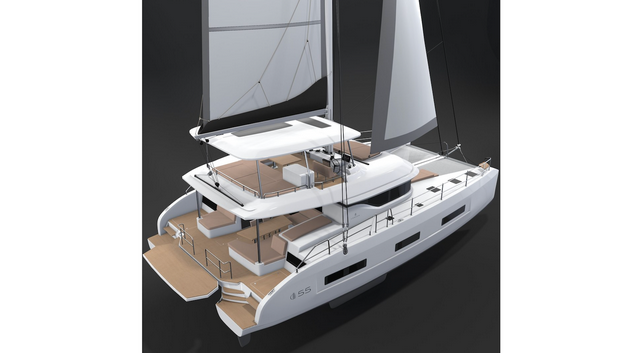
Fig 01 - Early Concept Model
Begin by uploading the concept image to Veras on the web at https://veras.evolvelab.io/ (Fig 02).

Fig 02 - Veras on the Web
Remember to start with something simple and don't iterate with all of your desired prompts at one time. Suggest one prompt at a time and render 3-4X. Then select the most desired image and repeat.
Prompt: Sailboat on ocean. This prompt may seem overly simplistic, but keep your prompts simple to start. If you don't get what you've imagined, add a bit more poetic detail to the previous prompt.
Results (Fig 03).

Fig 03 - Four Results
Preferred result. I liked this result because of a lot of subjective reasons. But mostly because of the way the sun illuminated the translucency of the sails, even highlighting the stitching and batton sleeves (Fig 04). Nice!

Fig 04 - Preferred Result
Now that we have a good baseline render let's keep building detail. The catamaran looks great on the water. The wake off the bow gives a sense of forward motion. Let's add some elements in the background to give more context and scale.
Prompt: Island in the distant horizon far right (Fig 05).

Fig 05 - Adding an Island in the Distance
Here's the preferred result (Fig 06). Just a hint of outcropping in the distance to move the attention from the catamaran diagonally across the image.

Fig 06 - Island in the Distance
Now that the exterior is complete, let's add some human activity. Once again - we'll start simple by adding only the figure at the helm (we'll add more people in a bit).
Prompt: Please add small figure seated at helm and steering. Please do not move camera.
Note: This prompt took 4-5 passes before successful. The captain would often appear out of scale with the seating area and overhead shelter. My sense is that Veras didn't have enough context to properly gauge the scale of the scene. That's why I ultimately used the term "small figure" to get the scale correct.
Here's the results (Fig 07).

Fig 07 - Captain at Helm
And Preferred result (Fig 08).
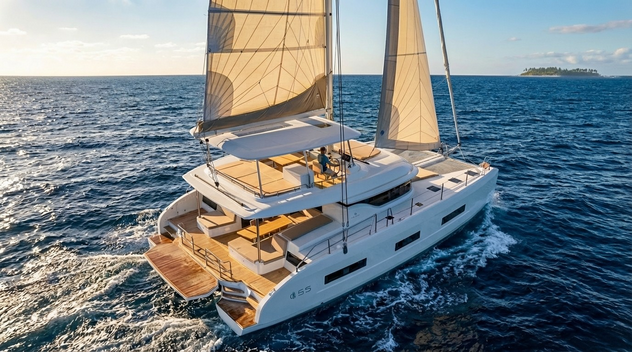
Fig 08 - Preferred Result with Captain at Helm
With just the addition of a single person, the rendering begins to tell a story. But at the moment, that story is about a lonely sea captain. Let's add a few more people to the scene and create a story about friends enjoying a holiday at sea.
TIP: Asking Veras, "Please do not move the camera" helps keep the origin and orientation of the viewer consistent. This is useful if the camera moves unexpectedly.
Prompt: A few people lounging on upper and lower deck areas Please do not move camera. (Fig 09).

Fig 09 - Prompting More Activity at Sea
Here's the results (Fig 10).
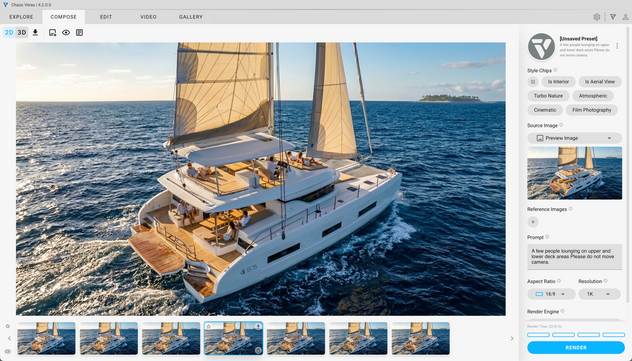
Fig 10 - Adding More People to the Upper and Lower Decks
Interestingly, this prompt also swapped out the lone Sea Captain for a sailor with improved scale. Happy Accident™ :). So I kept it.
And the preferred result (Fig 11).
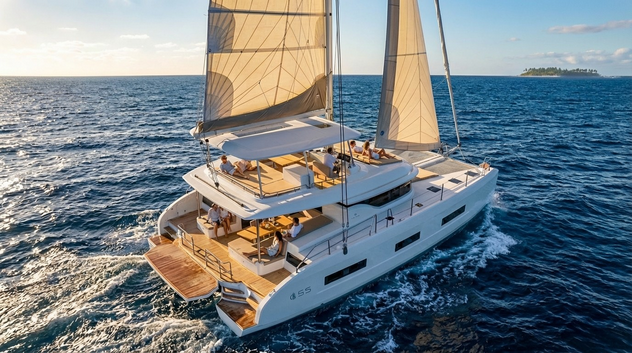
Fig 11 - Preferred Result with Lounging Companions
Scroll back to the top of the article and look at the starting image. Quite remarkable what you can do with Veras and a few elegant prompts. But let's not stop here and use this image to conclude the story. Let's see what happens at the end of a pleasant day at sea.
Prompt: early evening, calm water, colorful sky, at anchor, other sailboats also at anchor nearby, sails down, colorful seaside town in distance, relaxed casual dining people enjoying drinks and dinner.
And the results (Fig 13). Now we have a relaxing dinner party, moored off the coast of a seaside town. I preferred this image as the other nearby sailboats weren't lined up too carefully. The other sailboats are oriented a bit randomly, which seems more natural. Veras also did an amazing job of wrapping the lowered sails!
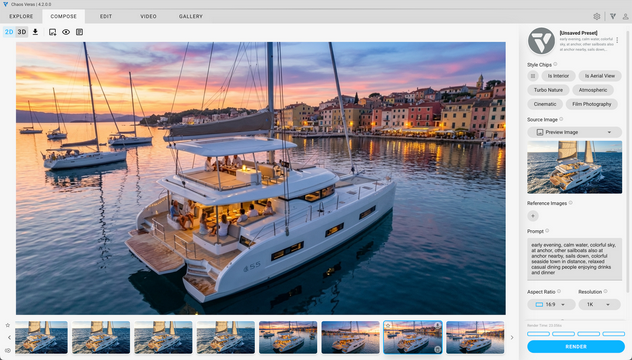
Fig 13 - Resulting Images
Here's the preferred result (Fig 14). Note the natural illumination from the cabin areas.

Fig 14 - Preferred Result
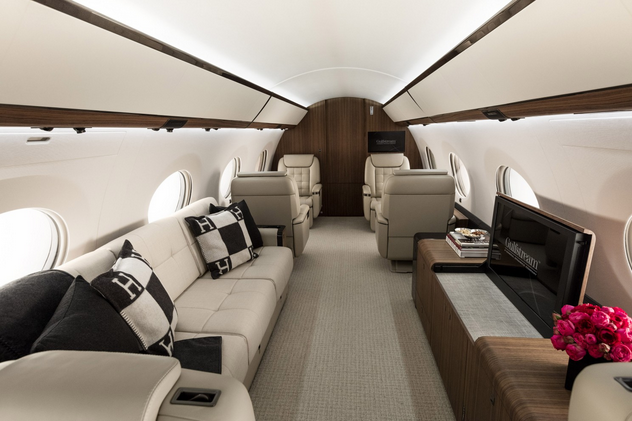
Okay - so Veras works with concept renderings of catamarans, but what about the real world? Here’s a few more examples of environments that aren’t traditional architecture, but could use a bit of human activity and context. Each base image (sans people) was given a single prompt and rendered 4 times. The preferred image is shown immediately after the base image.
Commuter Rail - Before and After:


Private Jet - Before and After:

Sailboat Interior Detail - Before and After:


High School Gymnasium: Before and After:


The above before and after sequences brings up an interesting point. You could spend a lot of time adding people and entourage to scenes in order to create realistic renderings but never get it "right". In my opinion, Veras does a better job at adding life-like realism.
For example, notice the bag and flip-flops placed casually below the table in one of the previous images. These kinds of little details are nearly impossible to imagine and incorporate given busy deadlines (Fig 15). Even the natural smudges on the heel and toe areas of the flip flops. :)

Fig 15 - Little Details Matter
There's more to life than Architecture! :) Just imagine all of the human activity outside of designing and rendering buildings. Whether a schematic computer model, sketch, detailed rendering or real-world as-built photograph, images are far more engaging with the addition of people, and entourage which give context, and scale. But most importantly, the addition people and entourage creates a sense of emotion and empathy and the sum becomes greater than the parts.
All it takes is an image and a few poetic prompts with Chaos Veras!
We hope this tips and tricks article helps you and your team get the most out of Veras. Questions, suggestions or comments? Please add your feedback in the comments section below! :) And don't forget to Sign Up for Enscape Monthly Updates!
ReadThomas would love to help you succeed with Veras, Enscape and your entire Chaos portfolio! Email us for a private demo or best practices webinar for your team. And when you purchase from ReadThomas, we’ll provide your team with complimentary training, implementation and support! www.readthomas.com.